|
I just got my DJ-70 MKII last night. It allows you to take the 2 mb of standard memory all the way up to 32 megs. I did it in just a couple of minutes with a phillips screwdriver.
Read the manual for about 5 minutes and was able to figure out all the basic functions and how to make a basic sample and assign it to certain keys or the user pads.
The interface is quite easy to figure out without a manual (actually I almost suggest chucking the manual).
I have yet to figure out how to dump info to my zip drive, but I'm sure it's a piece of cake.
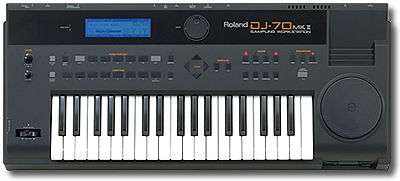
Cool Features: Sampling is retarded easy! Plug in any external 1/4 inch jack and sample directly to the machine by pressing a button or having a threshold set in the machine so that it automatically records when sound comes in. Each sample is recorded and then spread across the 36 key keyboard and when a key is played the sound you recorded is played at that key's particular note. ( You could play a burp song if you recorded a burp) Also, though people complain that the keyboard is too small, you can simple push the octave up/down key to have your sound moved up another set of keys or down. You really do have access to an entire keyboard! Samples can be recorded up to 6 minutes in length (though I haven't actually done this yet) when you upgrade the memory to 32 mb with standard SIMMs. Unlike lots of keyboards/samplers/synths, when you remove the back pannel to get to the guts of the machine, everything is layed out simple without millions of cords and computer bits dangling everywhere (unlike my old four track recorder that looks like a bowl of spaghetti when opened up). Like I said, I upgraded the memory in probably 5-10 minutes of fiddling about. You can save and import the patchs you make using a 100mb zip drive. I understand that people have not been able to get a Zip 250 to work with the Dj-70 MKII but I haven't tried my Zip 250 yet.
The scratch wheel is assigned a sound and of course you can scratch that sound with the wheel. Pretty basic and a neat toy.
The pitch bender stick does what it's supposed to do.
The only downside is the manual. The manual is horrible, terrible, and poorly written. Best try to figure out the machine by fiddling about or talking to someone who has it mastered.
All in all I'm extrememly pleased with my purchase and recommend this machine over any of the samplers that I have used before. Very instrument oriented instead of being just a rectangular recording device.
Get one if you can, it's a hell of a machine!
|